
Mobile Internet in the UK
Most visitors need mobile data for maps, transport apps, messages and bookings. You have three broad options: keep your home SIM and use roaming, buy a travel eSIM before you go, or buy a UK prepaid SIM or eSIM on arrival. Each has different costs, rules and limits, and the right one depends on your phone, how long you stay and whether you need a UK phone number.
This guide does not recommend a provider. It sets out the checks to make before you buy.
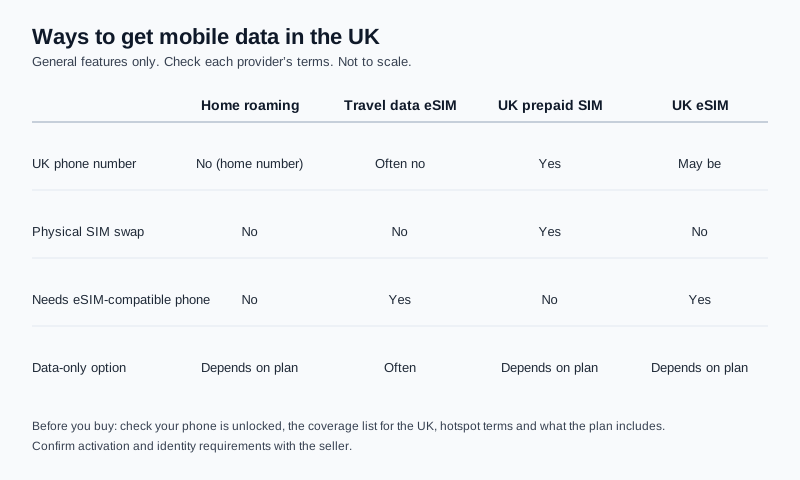
Physical SIM Versus eSIM
A physical SIM is a small removable card. To use a UK SIM, you remove your home SIM and insert the new one, unless your phone supports two lines. An eSIM is built into the phone and is set up digitally, usually by scanning a QR code or using the provider’s app. Many recent phones can hold an eSIM and a physical SIM at the same time, which lets you keep your home number active while using local data. Check your device model before you rely on this.
International Roaming
Roaming means your home provider connects your phone to a UK network. Charges, data allowances and daily or pack rates are set by your provider, and they can differ widely. Some providers include UK roaming in your plan, some charge per day, and some charge per megabyte. Check your provider’s roaming page for the United Kingdom before you travel, and ask whether data use can be capped.
Roaming keeps your home number, so calls and texts continue to work as usual, subject to your provider’s charges.
Travel eSIMs
A travel eSIM is a data plan you buy from a provider before the trip and install on an eSIM-compatible phone. It can be quick to set up and avoids a physical swap. However, many travel eSIMs are data-only. Some do not provide a phone number, ordinary calls or SMS, including calls to emergency services on that line. Some that do add a number may give you a foreign number rather than a British one.
Read the terms before you buy
Look for four things: whether the plan includes a phone number or only data, whether the coverage list includes the United Kingdom, whether hotspot use is allowed, and what happens when the data allowance runs out. These details vary by provider and plan.
Local Prepaid SIM Options
A UK prepaid (pay as you go) SIM gives you a UK number, and many plans include calls and texts as well as data. You buy a SIM from a shop, an online retailer or a network’s own store, and then activate it. Pay-as-you-go tariffs usually allow you to top up as you need. Prepaid products can differ in what they include, so compare the terms rather than the headline data figure.
UK Mobile Networks
The main UK mobile networks are EE, O2, Three and Vodafone. Many smaller providers, sometimes called MVNOs, sell plans on one of these networks. This guide does not rank networks or providers. Coverage, speed and value vary by location and by plan, so use the coverage and terms information in each provider’s own materials rather than a general ranking.
Checking Whether Your Phone Supports eSIM
Check eSIM support before you buy an eSIM from any provider. The steps below are based on third-party guidance, so confirm them with your phone manufacturer or carrier.
- Dial *#06# on your phone. If an EID (eSIM Identifier) number appears alongside the IMEI, the phone has eSIM hardware.
- On recent iPhones, look at Settings, then General, then About. Check that the phone is listed as supporting eSIM for your model, using Apple’s own support pages for your model.
- On Samsung phones, look at Settings, then Connections, then SIM Manager. An option to add an eSIM suggests eSIM support is enabled.
- Your home carrier can also confirm whether your phone supports eSIM and whether it is unlocked.
Checking Carrier-Lock Status
eSIM support and carrier lock are separate checks. A phone can support eSIM but still be locked to a single provider, which stops it accepting a SIM or eSIM from another provider. On recent iPhones, Settings, then General, then About shows a Carrier Lock line. The text “No SIM restrictions” suggests the phone is not locked. Phones bought outside the UK may still be locked, so check before you buy.
Data-Only or Voice and SMS Plans
Decide whether you need calls and texts, or data only. Data-only plans are often the cheapest way to get maps and messaging apps running. A voice and SMS plan gives you a number that others can call and text, and it is useful for banks, delivery services and local bookings that send codes by text.
| Option | Advantages | Limitations | Suitable traveller |
|---|---|---|---|
| Home-provider roaming | Keeps your home number; no purchase needed | Charges and allowances vary and can be high; check before travel | Short trips and travellers who need their home number |
| Travel data eSIM | Set up before the trip; no physical SIM swap | Often data-only; may have no UK number or SMS; needs eSIM and an unlocked phone | Data-focused travellers with a compatible phone |
| UK prepaid physical SIM | UK number; calls and texts depending on the plan | Needs an unlocked phone and a SIM swap; activation or ID may be required | Longer stays and travellers who need UK calls and texts |
| UK prepaid eSIM | UK number may be available without a physical swap | Needs an eSIM-compatible, unlocked phone; check activation terms | Travellers with a compatible phone who want a UK number |
Coverage Considerations
Coverage depends on the network, the location and whether you are indoors. Before buying any plan, check the provider’s coverage list for the United Kingdom. Ofcom, the UK communications regulator, publishes a mobile coverage checker that shows coverage by network and location. Use it to check the route you plan to take, especially if you will be outside major cities.
London and Rural Coverage
Central London usually has strong mobile coverage, but underground stations, some tunnels and crowded areas can be patchy. In rural areas, coverage can be weaker or limited to one or two networks. If you plan to hike, drive or visit remote coastal areas, carry a paper map and an offline map, and check coverage for your route in advance.
How Much Mobile Data You Might Need
Data use depends on how you use your phone. Maps and messaging use little data. Streaming video, video calls and uploading photos use much more. A simple way to estimate is to note your current monthly data use, scale it to the number of days you will travel, and add extra for maps and bookings. Choose a plan with some headroom rather than the smallest allowance.
Buying Before or After Arrival
Buying before you travel lets you compare options, read the terms and install an eSIM before you land. Buying after arrival lets you see the options in person. The right choice depends on how confident you are with the phone and whether you need a connection as soon as you land.
Activation and Identity Requirements
Requirements for activating a SIM or eSIM vary by provider and by the product. Some sellers ask for your passport or another form of ID when you buy. Some products need a UK payment method, a UK address or an account to activate. One 2026 guide says ordinary pay as you go SIMs can be bought without ID, but practice differs between shops and providers, so check the terms and bring your passport.
Also check the validity period and what happens if you do not top up. These rules affect how long a number remains active.
Airport Purchase Considerations
Airports often have shops selling SIMs and eSIMs. They are convenient but can cost more than buying online. Check the opening times, ask what the plan includes and confirm that the SIM works on your phone before you leave the counter. If you buy an eSIM at the airport, make sure you have connectivity to set it up, or download the setup information before you travel.
Mobile Hotspot and Tethering
Hotspot use is not included in every plan, and some providers limit it. If you plan to share your connection with a laptop or another device, check the hotspot terms before you buy, including any limits on speed or data.
Calling and Receiving Texts
A data-only eSIM may not let you make or receive calls or texts. Some banks, delivery services and online accounts send one-time codes by SMS. Before you travel, check with your bank and the services you use whether codes can reach the number you will use in the UK. This guide does not guarantee that any bank or service will accept a particular number or method.
Wi-Fi calling is also not guaranteed. Whether it works depends on your phone, your provider and the network you are on.
Keeping an Existing Number Active
If you keep your home SIM, your number stays active through your provider. If you swap to a UK SIM, check whether your home number will be suspended and how to receive calls on it. Some phones can keep two active lines, so you may be able to keep your home number and use a second line for data.
Security on Public Wi-Fi
Free Wi-Fi is available in many cafés, stations and public spaces. Use it for general browsing, but avoid logging in to banking or sensitive accounts on networks you do not trust. Keep your phone’s software up to date and check that your device is set to ask before joining unfamiliar networks.
Common Connectivity Mistakes
Assuming a travel eSIM includes a UK number
Many travel eSIMs are data-only. If you need calls or texts, check the plan first.
Buying an eSIM for a phone that is locked
A locked phone may not accept another provider’s eSIM or SIM. Check the carrier-lock status before you pay.
Ignoring roaming charges on the home SIM
Roaming can be expensive if you use data without a plan. Turn on data roaming only after you have checked the rates.
Frequently Asked Questions
Do I need a UK SIM if I have an eSIM?
Not necessarily. A travel data eSIM or your home roaming may be enough. Choose a UK number if you need calls, texts or local services that use UK numbers.
Can I keep my home number while using a UK eSIM?
On some phones that support two active lines, yes. Check your phone model and your provider’s terms before you rely on this.
Does a UK SIM work with any phone?
Only if the phone is unlocked and compatible with the network and SIM type. Check the phone and the provider’s compatibility information before you buy.
Decision Checklist
- Confirm whether your phone supports eSIM, and whether it is unlocked for another provider.
- Decide whether you need a UK number, calls and texts, or data only.
- Check your home provider’s roaming terms for the United Kingdom.
- Check the provider’s coverage list for the United Kingdom and your route.
- Confirm the hotspot, validity and activation terms before you buy.
- Check that codes from your bank or services can reach the number you will use.
Your entry requirements do not depend on your phone plan. For visa and ETA guidance, check the UK ETA requirements guide before you travel.